Specification

Hybrid Edge JEP Studio specification

The full learning space, how it works with or without the internet, and how it grows.

Design specification. It describes the Studio as designed, not equipment installed at Spectrum.

Architecture

From learner to world

Local first: the first four layers run without the internet; the last two need a connection.

  1. Learners and teachersStart from a real question; the teacher guides
  2. Learner computersOne per learner in a full Studio
  3. Managed local network and Wi-FiFiltered, with separate learner, staff and management networks
  4. Edge server and local learning environmentLessons, library, portfolios and assessment, offline
  5. Satellite internet gatewayWhen a connection is available, with mobile-data backup
  6. Wider world and SXLA Central Hub/EdgeKnowledge, AI, people, approved updates and backup
Works offlineLayers 1 to 4Needs internetLayers 5 and 6

EDGE is the offline digital layer of the Studio: the edge server, the local network and the link to the SXLA Central Hub/Edge. This page covers the whole learning space. Explore Offline Capabilities

Components

What runs in the Studio

Five services are essential from day one. Local AI and cloud services are added in stages.

Offline learning platform

JEP units for S1 to S4, session plans and learner activities.

Works offline

File storage and portfolios

Each learner’s project work and evidence of reasoning.

Works offline

Digital library

Reference material, textbooks and video, without internet.

Works offline

Assessment records

Teachers score work against the six-capability JEP rubrics.

Works offline

Managed Wi-Fi and accounts

Secure log-in, content filtering and fair device sharing.

Works offline

Local AI assistant

A narrow, supervised tutoring role, added in stages.

Works offlineNeeds specific hardware

Cloud services

Remote mentors, research tools, advanced AI and encrypted backup.

Needs internet

EDGE technical specifications

Operating modes

With fast, slow or no internet

When connectivity drops, capability steps down. Core learning continues in all three conditions.

Internet available

Full use: local resources plus online research, advanced AI, remote mentors, updates and backup.

Internet slow

Local resources first. Priority tasks use the link; large updates wait for quiet hours.

Internet unavailable

Lessons, library, portfolios and assessment continue on the local network. Online services pause.

Modules

Built in modules

Each module can be added or upgraded without rebuilding the rest. Every Studio also has the network, the JEP learning content and governance.

Computing

Includes: Laptops, peripherals and charging cabinets.

Grows by: More or better devices, and specialist workstations.

Edge server

Includes: The server that runs the local learning environment.

Grows by: More memory, or a second server.

Storage

Includes: Mirrored drives for the library, portfolios and records.

Grows by: More drives when data reaches 70% of capacity.

Local AI

Includes: Approved AI tools and the rules for their use.

Grows by: A graphics card, or a separate local AI server.

Robotics and physical computing

Includes: Space and a network reserved for future devices.

Grows by: Robotics kits, sensors, microcontrollers and fabrication, once a unit design exists.

Power

Includes: UPS, inverter, batteries and solar panels for critical loads.

Grows by: More panels and batteries, and monitoring.

Connectivity

Includes: A satellite or other internet gateway.

Grows by: A failover link and wider coverage.

Configurations

Lite, Standard and Advanced Studios

The same modules combine into three configurations. All share the same governance and data protection.

ModuleLiteStandardAdvanced
Computing10 to 20 laptopsAbout 40 laptops40 or more, plus specialist workstations
EdgeSmall server or mini-PCEdge server with mirrored storageEdge server plus a local AI server
NetworkRouter and one or two access pointsFirewall, managed switch, three access pointsWider coverage, faster switching
PowerUPS and small solarUPS, hybrid inverter, expandable solarLarger solar and battery bank, with monitoring
ConnectivityMobile data or satellite internetSatellite internetSatellite internet plus failover
LearningJEP curriculum and offline libraryFull offline learning environmentAdds advanced content and tools
AIApproved cloud AI where connectedCloud AI plus selected local AILocal AI and GPU capacity
Robotics and physical computingNoneReserved space and networkRobotics, electronics, fabrication
GovernanceFull policy setFull policy setFull policy set

From SXLA’s Technology, Data Protection and Digital Plan, Annex 17. No vendor is named.

Portable configuration

JEP Mobile Kit

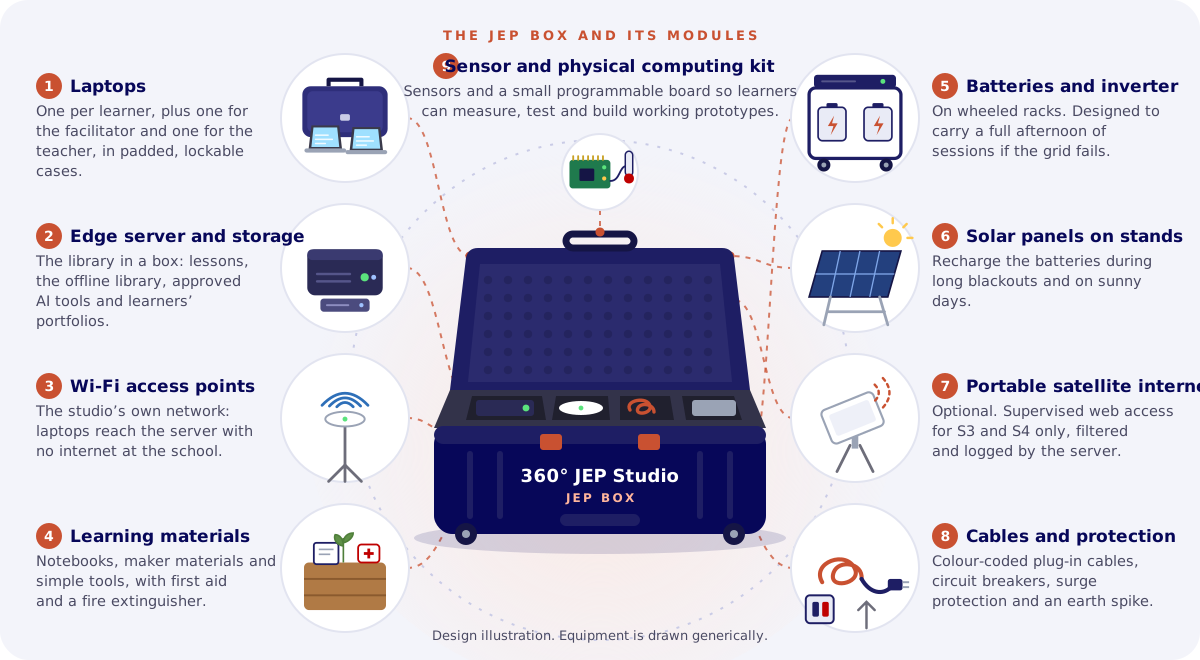
A complete studio in six portable modules, with its own edge server, Wi-Fi, power and laptops, that travels to partner schools, in Lite, Standard and Advanced sizes, with a sensor and physical computing kit.

See the kit, step by step
Data protection

Learners’ data stays protected

Local by default

Learners’ personal data stays on the school’s own server and never goes into public AI tools.

Protected on the server

Encryption at rest, role-based access, audit logs and minimal data collection.

Consent and the law

Parental consent for learners’ data, in line with Uganda’s Data Protection and Privacy Act 2019 and its Regulations.

Pseudonymised summaries only

Each school controls its own learner records. The SXLA Central Hub/Edge receives pseudonymised summaries only.

Privacy notice Safeguarding

Requirements and limits

What the Studio depends on

Offline use covers only what is stored in advance. Local AI depends on hardware, syncing on a connection, and security on care every term.

Requirements and Limits in Full

Design values only. SXLA’s documents give proposed minimums and design estimates, validated by a site assessment. This page makes no claims about speed, capacity, uptime, cost savings or the number of users served.

Help equip the Hybrid Edge JEP Studio

Support helps equip the Studio at Spectrum Secondary School, built to this specification.

Keep exploring

Explore more

JEP Studio

Why SXLA created JEP, and how learners move from a real challenge to knowledge, action and feedback.

Find out more